Get Your Store Built
Watch the setup video, create your Shopify store, and share access — everything you need in one step.
1. Watch This Video First
This 5-minute video shows you exactly what to do — and what we'll handle for you.
Watch this video if you are on desktop
Watch this video if you are on your phone
What you'll do
Create your store, start your free trial, and submit collaborator access.
What we'll do
Build everything for you — products, design, and complete setup.
No worries about
Design, products, or technical setup — we handle it all for you.
2. Create Your Shopify Store
Sign up for a Shopify account so we can start building your custom store.
Get a free Shopify trial
3 days free, then $1/month for 3 months
- Click the button below to open Shopify in a new tab
- Enter your email & Create your password
- Start your paid trial
- Come back here once your store dashboard loads
Tip: Use a store name that reflects your niche. You can always change it later in Shopify settings. Don't overthink this step
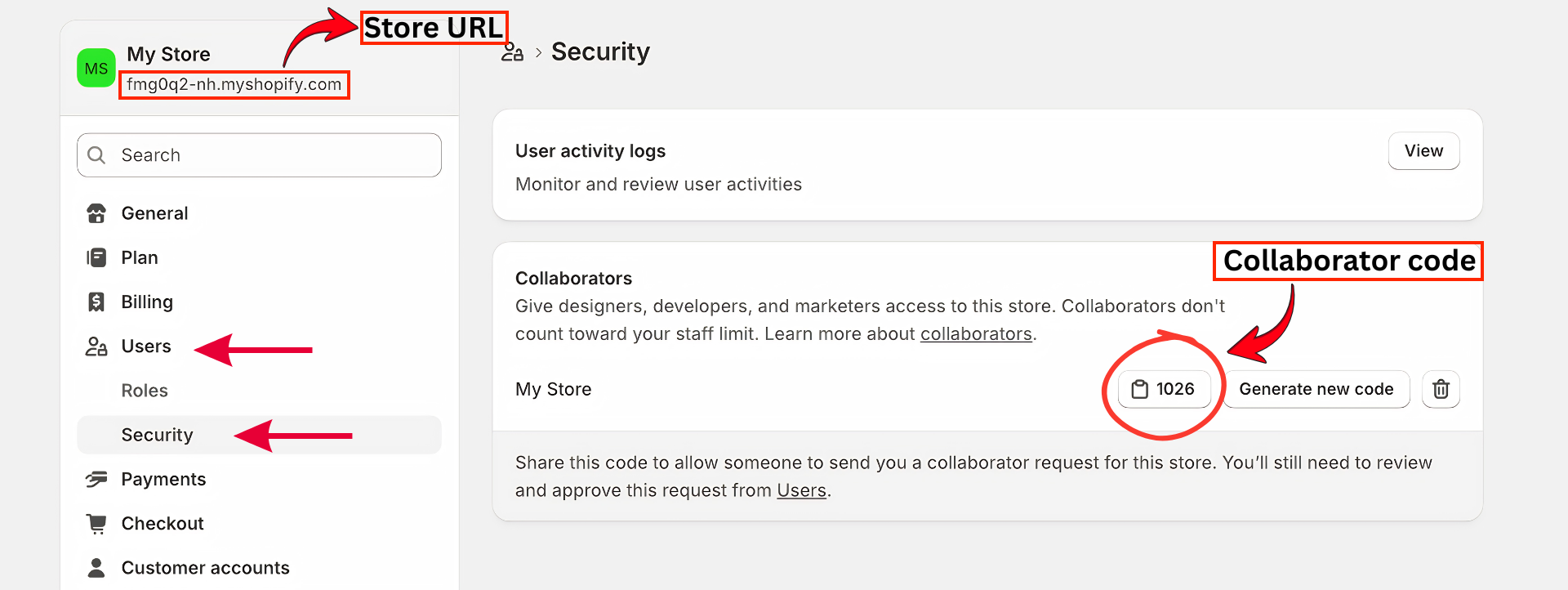
3. Submit Collaborator Code & Store URL
Share your Shopify collaborator code and store URL so our team can access your store and start the build.